Digiotouch AI Team
17 Aug 2026
7 in 10 professionals would let AI take their meeting notes
Meeting Productivity

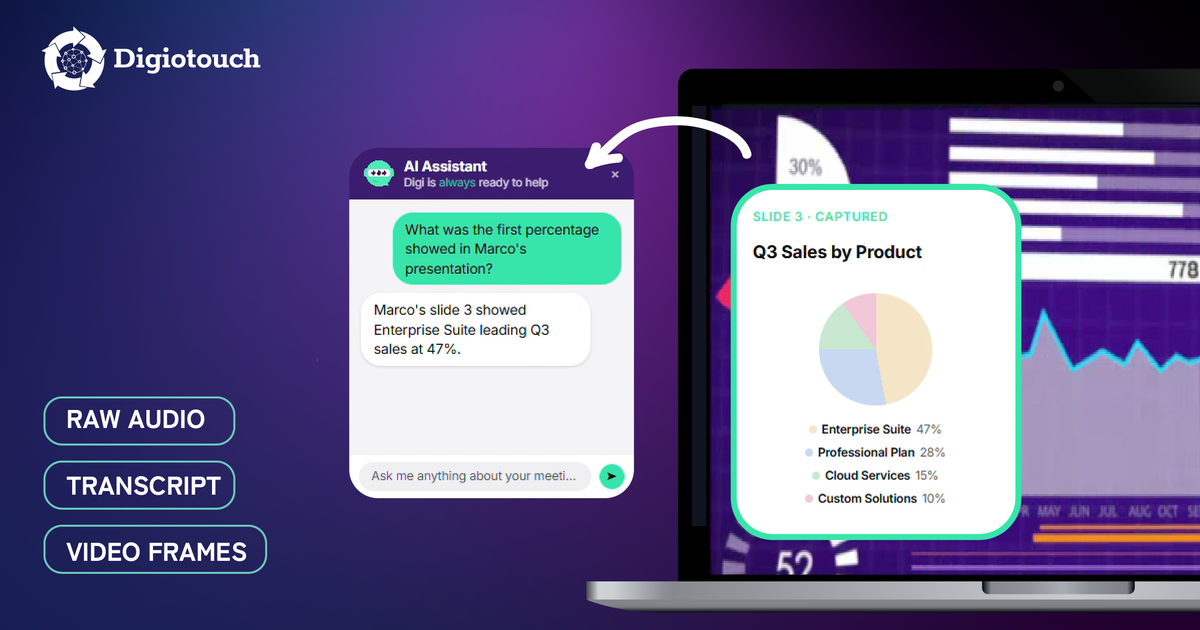
Most AI meeting tools build their summaries from the transcript alone, a pattern the leading independent notetakers describe in their own public product materials. Even when the meeting video is recorded for replay, the summary, action items, and post-meeting chat are generated from text. Digiotouch AI takes a different approach: visual frames, raw audio, and transcript are processed together as one unified multimodal input, so the summary can reflect what was shown on screen, not just what was said about it.
Marco runs the weekly product review. He is a senior product manager at a B2B SaaS company. Every Tuesday he walks the team through Figma frames, an analytics dashboard, and the occasional Loom demo, on Zoom one week, Google Meet the next. The conversation around each visual is the meeting; what changes, what ships, what gets parked. After every session, his AI notetaker delivers a clean transcript and a tidy summary. A week later, Marco reopens the notes and reads action items that say “tighten the new flow” and “verify Sarah's chart”, but the summary describes none of the visuals those decisions were anchored to. The recording is there. The transcript is there. The AI's understanding of what was actually on screen is not.
The shape of meetings has shifted. A typical product review or sales discovery in 2026 spends as much time on a shared screen, Figma boards, analytics dashboards, customer journey maps, spreadsheets, as it does on spoken dialogue. AI meeting tools have largely missed this shift, and their meeting notes show it. In mid-2025, Microsoft announced screen content analysis for Teams intelligent recap, described by industry coverage as a fix for “a glaring blind spot” in meeting summaries, citing missing context from shared spreadsheets, presentation slides, charts, and on-screen documents. Microsoft's own feature description says the recap will capture details shown when a participant shares their screen so that “unspoken insights” become part of the record; the rollout, initially planned for late 2025, began reaching Teams desktop and web in early 2026. That a platform of Microsoft's size framed this as fixing a category-wide gap tells you how common the gap is. And yet most independent AI notetakers still build their summary from transcript text alone.
Because nearly every AI meeting tool builds its summary, action items, and chat from the transcript text. The leading independent notetakers describe this pipeline in their own public product materials: post-meeting, the transcript is used to generate the summary, topics, and action items. One widely used tool's compliance documentation makes the architecture explicit: it offers a recording mode in which both the audio and the transcript are deleted after the summary is generated, which is only architecturally possible if the summary was built from text. Some minimalist notetakers never capture screen or audio at all, by design, and generate notes from the transcript stream only. Across the category, the pattern is consistent: speech-to-text, then a language model over the resulting transcript. Visual frames are not part of the input.
How Digiotouch AI handles this: Digiotouch AI takes a different architectural approach. Visual frames, raw audio, and transcript feed the AI as a unified multimodal input. The summary, action items, and chapters are generated from all three streams together, so the result can reflect what was shown on screen, not just what was said about it.
The parts of a meeting that depend on what was visible. A product review may spend ten minutes pointing at a Figma frame and saying “push this padding right”; without the frame, the action item is meaningless. A finance review where someone says “Q3 jumps here” loses the chart. A demo where the host says “watch what happens when I click Save” loses the click. Recording the meeting video, as many tools including Digiotouch AI do, preserves the visuals so users can replay them later. But replay is a human workaround. The AI itself, in tools whose summaries are built from transcripts, never sees what was on screen. The more visual the meeting, the larger the gap between what was discussed and what the AI actually understood.
How Digiotouch AI handles this: Because Digiotouch AI processes the visual frames as part of its summary input, the AI's output can reference what was actually shown. An action item like “verify Sarah's chart” is anchored to the chart; the chapter for the dashboard review reflects the dashboard, not just the talking. The visual content becomes part of the meeting's understanding, not just its replay.
Not on its own. Recording stores the visual stream so users can replay later, but the AI summary, action items, and post-meeting chat are typically still generated from the transcript. Recording is for replay; understanding is for processing. They are two different problems requiring two different design choices, and vendors' own materials position video capture as a playback feature, a way to replay meetings with video, audio, and transcript together, not as a visual input to the AI summary. The hidden cost stays hidden whether or not a video file exists, because the AI never reads the visual. Closing the gap requires multimodal processing: feeding visual frames into the model alongside audio and transcript, so the meeting record holds what was shown as well as what was said.
How Digiotouch AI handles this: Digiotouch AI handles both. The full meeting including any screen share is recorded and shown on the meeting page with chapter navigation, so users can replay specific moments. And the visual frames feed the AI together with raw audio and transcript, so the summary, action items, and chapters reflect what was on screen, not just what was said. Recording and understanding are separate problems, each with the right architecture.
By matching the architecture to the meeting medium. Conversational meetings, quick check-ins, 1:1s, sales discoveries that are mostly dialogue, are well served by transcript-driven AI. Visual meetings, product reviews over Figma, dashboard walkthroughs, demos, design critiques, depend on what was shown, and a transcript-only summary will systematically miss it. Microsoft acknowledged this by announcing screen content analysis for Teams in mid-2025, framed as fixing a category-wide gap. Digiotouch AI took a multimodal approach from the start. Other tools may follow; until they do, the AI's input architecture is the most useful question to ask before picking a notetaker.
How Digiotouch AI handles this: Digiotouch AI's meeting page combines the multimodal AI output, summary, action items, chapters, and conclusion, with the recorded video including screen share. Each AI-generated section is editable for revision. Integrations push the meeting note to Notion, Confluence, Google Docs, and SharePoint, beside the deck or dashboard the meeting was about. One honest current limitation: the meeting page editor only supports revising the AI-generated sections, not adding new content blocks like external links or attached files.
Rather than naming individual tools, this snapshot compares Digiotouch AI with the two patterns that dominate the independent notetaker category as of mid-2026: tools that record video for replay but drive their AI from the transcript, and tools that are text-only by design.
| Capability | Digiotouch AI | Recording notetakers with transcript-driven AI | Text-only notetakers |
|---|---|---|---|
| Audio and transcript captured | Yes | Yes | Yes |
| Full meeting video including screen share recorded | Yes: on all platforms | Often; sometimes limited to higher plans | No, by design |
| Video replay on the meeting page | Yes, with chapter navigation | Common, as a playback feature | No |
| AI summary input | Multimodal: visual frames, raw audio, and transcript together | Transcript text, per the vendors' own public materials | Transcript text, by design |
| Summary reflects on-screen visuals | Yes | No | No |
| Push notes to where slides usually live | Notion, Confluence, Google Docs, SharePoint | Varies by tool | Selected integrations |
Pattern descriptions summarise the vendors' own public product and compliance materials as of mid-2026. The one named exception, Microsoft Teams screen content analysis, is covered by the citations in this post.
As of mid-2026, the leading independent AI notetakers do not process visual frames as input to their summary. Microsoft Teams was the first major platform to move, announcing screen content analysis in mid-2025 and rolling it out from early 2026. Digiotouch AI took a multimodal approach from the start. The honest comparison is not which tool records the most; it is which one's AI actually reads what was on screen.
If your meetings live on a shared screen, pick a tool whose AI actually reads it. Digiotouch AI's integrations then put the full meeting record where each team works: Notion, Confluence, or Google Docs for documentation-first product teams, SharePoint for storage-centred organisations, and task boards like Asana or Trello for delivery teams. Try it on your next visual meeting with the free plan.
Yes, and the AI processes it. Digiotouch AI records the full meeting including any screen share, and the visual frames feed the AI together with raw audio and transcript when generating the summary, action items, and chapters. Users can also replay specific moments using chapter navigation on the meeting page. Most independent AI notetakers do the recording but generate their summary from the transcript only; Digiotouch AI does both.
Recording stores the video stream so users can replay the meeting later: useful, but a human workaround. Capturing visual content for the AI means the model itself processes the visual input as part of generating the summary, action items, and chat answers. Most AI notetakers do the first; very few do the second. Microsoft announced screen content analysis for Teams in 2025, rolling out from early 2026; Digiotouch AI has been multimodal from the start.
Because speech-to-text plus a language model running over the resulting text is the easiest pattern to ship, and the leading notetakers describe exactly this pipeline in their own public materials. One widely used tool even offers a compliance mode in which audio and transcript are deleted once the summary is generated, which is only possible if the summary was built from text; some minimalist tools are text-only by design. Adding visual understanding requires multimodal processing of the video stream: heavier to run, harder to do well, and a different architectural choice.
It means the AI does not summarise from a transcript alone. Visual frames from any screen share, raw audio features from the meeting, and the transcript are processed together as a unified input to the model. The result is a summary that can reflect what was shown on a slide or dashboard, not only what was said about it.
Yes. Digiotouch AI supports file upload for existing audio and video recordings, and processes the upload through the same multimodal pipeline as a live capture, generating a summary, action items, transcript, chapters, and conclusion.
Many tools in both camps record the full meeting. The architectural difference is the AI input: transcript-driven notetakers state in their own materials that summaries are generated from the transcript, while Digiotouch AI uses a multimodal pipeline that includes visual frames. So when the summary references a chart, dashboard, or Figma frame, Digiotouch AI's reflects what was actually shown; a transcript-driven summary reflects what was said about it.
The direction is clear. Microsoft began shipping screen content analysis for Teams from early 2026, and the rest of the category is moving toward multimodal processing. Digiotouch AI took this approach from the start. Until multimodal becomes standard, the question to ask before choosing an AI meeting tool is: what does the AI actually read?